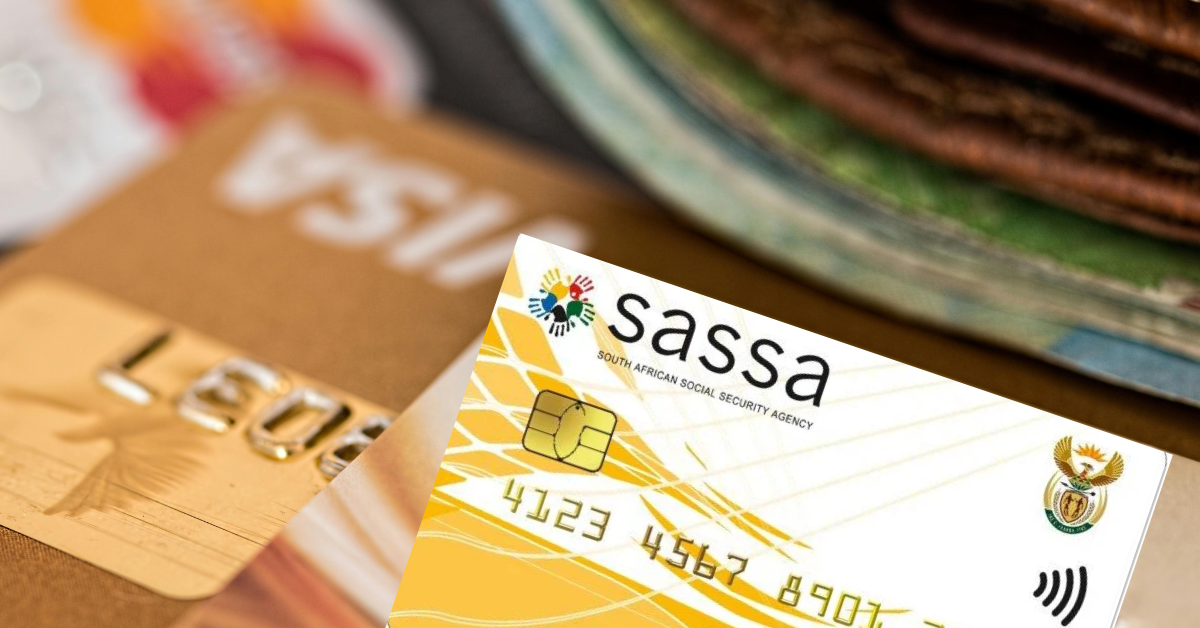
From April 1, 2026, beneficiaries of the South African Social Security Agency (SASSA) will receive small increases in their payments. The only exception is the COVID‑19 Social Relief of Distress (SRD) grant, which will stay at R370 monthly until 2027 without any increase.
These adjustments translate to increases of roughly 3.6%–3.7% for most permanent grants, slightly above the current inflation outlook.
How much increase for the SASSA grant
Old age, war veterans, disability, care dependency will increase by R85; foster care will increase by R40; child support and grant-in-aid will increase by R20; and SRD will remain the same.
According to the 2026 Budget Review and accompanying government communication, the increases for the 2026/27 financial year are as follows:
April 2026 SASSA grant amounts
- Old age grant: from R2 315 to R2 400 per month.
- War veterans grant: from R2 335 to R2 420 per month.
- Disability grant: from R2 315 to R2 400 per month.
- Care dependency grant: from R2 315 to R2 400 per month.
- Foster care grant: from R1 250 to R1 290
- Child support grant: from R560 to R580 per month.
- Grant‑in‑aid: from R560 to R580 per month.
- SRD grant: remains at R370 per month, with payments extended until 31 March 2027.
April 2026 SASSA grant dates
- Older Persons Grant: April 2, 2026 (Thursday).
- Disability Grants: April 3, 2026 (Friday).
- Children’s Grants and all other grants: April 6, 2026 (Monday)
Tighter checks still on
Alongside the increases, there will be tougher eligibility, verification, and fraud within the grant system. Treasury has made SASSA’s 2025/26 funding conditional on improving biometric and income verification, conducting more frequent reviews, and strengthening compliance measures.
SASSA’s upgraded systems have already led to hundreds of thousands of beneficiaries being flagged for review and tens of thousands of grants being terminated where they did not meet the criteria, contributing to projected savings of several billion rand over the medium term.
The government argues that more accurate targeting will free up resources for those who need support most, but advocacy groups warn that aggressive verification can also exclude vulnerable people who struggle with documentation or digital processes.
How to apply for the SASSA R370 grant
Use only official SASSA channels and submit one application
1. Online via the SRD website
- Go to the official SRD site: https://srd.sassa.gov.za/
- Select the option for South African ID holders
- Enter your mobile number and click send sms, then enter the OTP received
- Read and accept the declaration/consent so SASSA can verify your information, then submit.
- Enter personal details, ID number, name and surname, gender, disability status, cellphone number, and residential address.
- Enter employment information and lifestyle sustainability information
- Choose your payment option (bank account is fastest), and capture the correct banking details if you have an account.
2. WhatsApp
- Save and open the official SASSA/GovChat WhatsApp line 082 046 8553.
- Send “hi” or the keyword shown in the menu, and follow the prompts to “Apply for SRD R350/R370”.
- Enter your ID/permit details, personal information, and payment choice when asked, then confirm and submit.
3. USSD (basic phone, no data needed)
- Dial 1347737# on your cellphone and follow the menu for “SRD R350/R370”.
- Type in your ID number, personal details, and preferred payment option when prompted, then confirm the application.
SASSA assesses applications monthly, so even after first approval, your income is re-checked every month before payment.
How to check 370 SASSA status
After applying for a SASSA grant, beneficiaries often want to know whether their application has been approved and when payments will be made. Fortunately, SASSA offers several secure and convenient ways to check your status. Don’t forget to use the same ID number and contact details you provided when applying.
1. Online:
- Visit the official SASSA SRD website: https://srd.sassa.gov.za/sc19/status
- Enter your South African ID number and the mobile number used in your application.
- Submit the form to see whether your application is approved, pending, or declined. If approved, payment dates will also be displayed.
2. WhatsApp:
- Save SASSA’s WhatsApp number: 082 046 8553
- Send a message and follow the prompts to provide your application ID and details. You will receive your grant status via chat.
3. SMS:
- Open your messaging app and send: STATUS <space> ID number to 32555
- You will receive a reply with your current grant status.
4. Call or visit in person:
- Call SASSA toll-free at 080 060 1011 for assistance.
- Alternatively, visit your nearest SASSA office to check your status in person, including biometric queries if needed.
How to change SASSA banking details (permanent grant recipients)
Permanent SASSA beneficiaries generally cannot change all their personal details online, especially for regular grants like the old age, disability, or child grants.
For most permanent grants, changes such as banking details or payment methods must be made in person at a SASSA office by completing the required forms and submitting supporting documents and biometrics for verification.
- Visiting the nearest SASSA office is mandatory. Changes to payment methods cannot be made online for permanent grants.
- At the office, you must request and complete the “Payment Method Change Form” (also known as the “Consent Form for Bank Payment”).
- To verify the new payment details, you must present the following:
- Your Valid South African ID (Original and copy).
- Proof of the New Bank Account: This must be an official document: a stamped bank statement (no older than three months) or an official letter from the bank confirming the account is active and in your name.
- SASSA will not pay into an account that is not solely in the beneficiary’s name (no joint or third-party accounts).
- The SASSA official will process the form. The new details are then sent to the bank for verification, which can take up to 21 working days.
- For the change to take effect in the following month’s payment, the request generally needs to be submitted before the 15th of the current month. If you miss this deadline, the old payment method will be used for one more cycle.
How to change SASSA banking details (SRD grant)
The Social Relief of Distress (SRD) R370 grant was introduced as a rapid, special relief measure. Its administration was designed to be electronic-only to process a massive volume of applications quickly and remotely.
The process to change your bank details for the grant is managed entirely online through the official SASSA SRD website. This process is highly secure and ensures the new account is verified as belonging to you.
- Visit the Official SASSA SRD Portal: Navigate to the dedicated SASSA SRD website:
- Locate the banking details section by scrolling down to find the section labeled “How do I change my banking details?” or a similar prompt.
- Carefully input your South African ID Number (13 digits) in the provided box.
- SASSA will send a unique, secure link via SMS to the cellphone number that is currently registered on your grant application.
- Click on the link provided in the SMS. This will take you to a secure page on the SASSA portal.
- Follow the prompts to enter your new bank account information (Bank Name, Account Number).
- Submit the new details. Crucially, the bank account must be in your name as it appears on your ID. SASSA cannot pay grants into a third-party account.
- The new details will be sent to the bank for verification. This process can take a few days to weeks. The updated details will only be used for future payments after successful verification.
Important Note: If you choose the money transfer option (cash send), your mobile phone number must be registered in your name (RICA-compliant).
Alternative Method: Contacting SASSA directly
If you experience difficulties with the online portal (which can sometimes occur, particularly when changing your phone number), your next best option is to contact SASSA directly.
Use the SASSA Toll-Free Helpline: 0800 60 10, send an email to [email protected], or visit your nearest SASSA local office for in-person assistance. This is often the safest and most reliable method for complex changes, although it may involve waiting times.