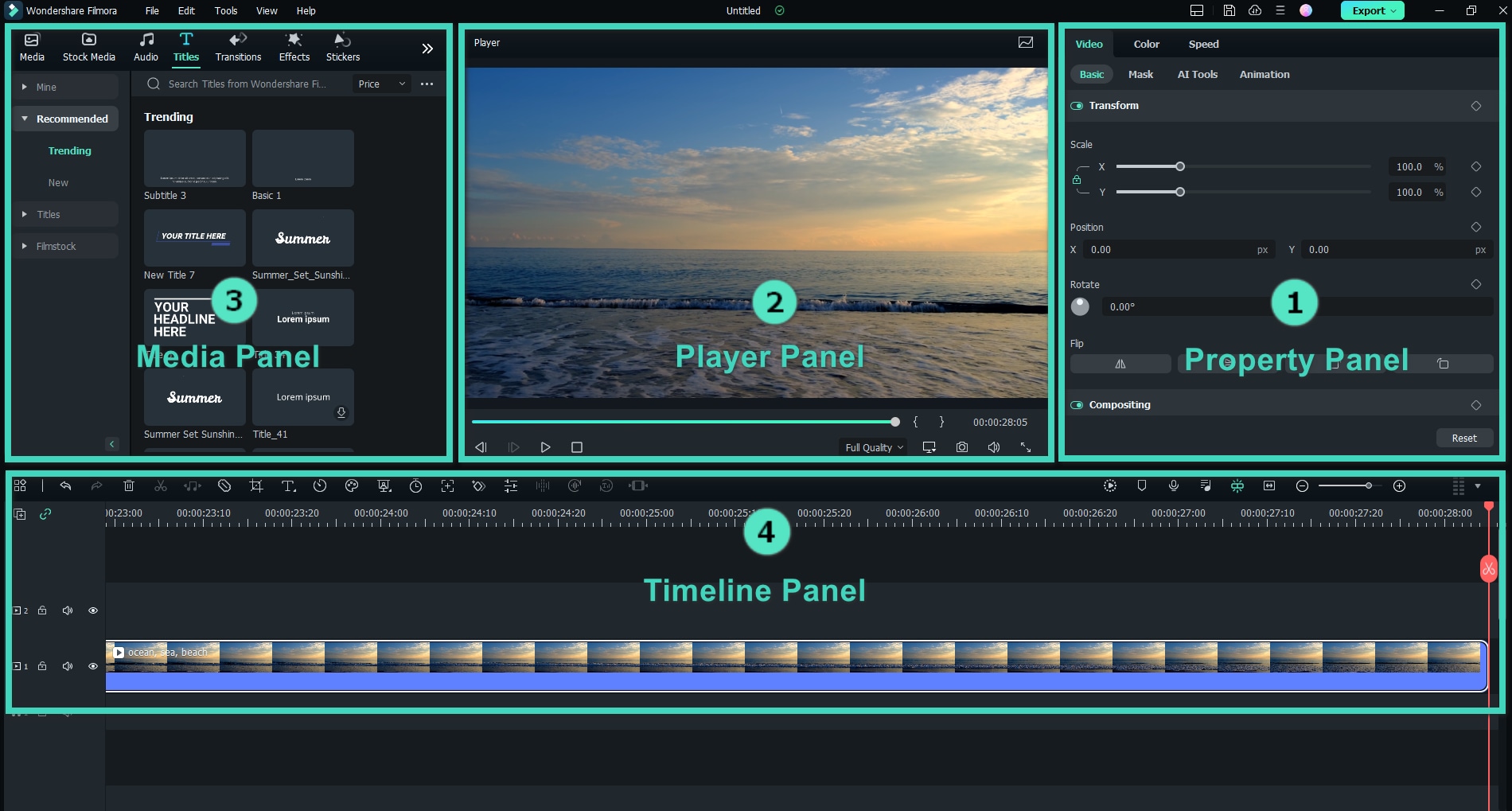
Nowadays, there are many video editing software that can help creators and editors alike to begin their creation journey. You don’t always have to depend on complex and pricey software anymore. Wondershare Filmora, for example, is one of the best video editing software for those on the lookout for an easy-to-use yet powerful video editing tool.
To give you more details about the software, we tried to put together a detailed review based on our own experience using Filmora. Let’s see what it has to offer.

Part 1. Filmora Video Editor at A Glance
Part 2. What We Love about Filmora Video Editing Software
Part 3. Considerations with the Filmora Video Editor
Final Thoughts
Part 1. Filmora Video Editor at A Glance
Right off the bat, Filmora impresses with its intuitive interface that makes it incredibly easy for beginners to navigate while still offering advanced features that seasoned editors will appreciate.

Moreover, Filmora offers comprehensive support for image, video, and audio editing. It has everything you almost need to create a professional-looking project. What’s more, this video editing software frequently updates with new AI-driven features to streamline the editing process.
Performance and Compatibility
Filmora runs smoothly when editing 1080p videos and handles more detailed 4K footage with ease. You can apply effects, transitions, and edits without noticeable lag, even when dealing with larger files. If your system starts to struggle during the editing process, Filmora will display a performance warning.
Minimum System Requirements:
- Operating System: Windows 7/8/10/11 (64-bit OS recommended) or Mac OS X 10.11 or later.
- Processor: Intel 6th Gen, AMD Ryzen 3 1300X or higher.
- RAM: 8 GB RAM (16 GB required for HD and 4K videos).
- Graphics: NVIDIA GeForce GTX 1050TI or later; NVIDIA GeForce MX550 or later; AMD Radeon RX 500 or later (except Radeon RX VEGA Series); Intel UHD Graphics 630 or later.
- Disk: At least 10GB of free hard disk space for installation (SSD-Solid State Disk recommended for editing HD and 4K videos).
Who It’s for
- Beginners and Casual Editors: If you’re new to video editing, Filmora is perfect for you. Its intuitive interface and straightforward tools make it easy to learn and start creating right away.
- Marketers: Creating promotional videos, ads, or branded content is seamless with Filmora. Its video templates, animations, and export options for social media platforms make it a practical choice for marketers.
- Social Media Content Creators: Filmora AI features and creative assets make it easy to create engaging, scroll-stopping content that aligns with current trends.
- Educators and Students: You can create educational videos, tutorials, or presentations with Filmora. It even offers special prices for students and educators.
- Small Businesses: Filmora helps small businesses create promotional videos without needing a dedicated video production team. Its AI tools and features help anyone create and edit videos—something that most free video editing software often lacks.

Part 2. What We Love about Filmora Video Editing Software
As one of the easiest video editing programs, Filmora makes video editing accessible to everyone, regardless of skill level. And since you can almost find all the tools you need within one platform, we rarely need to switch between multiple apps or programs to get the job done.
Here’s a closer look at why Filmora is one of the best video editing software for PC and Mac.
Easy-to-Use Features and Tools
- Drag-and-Drop Interface: Filmora’s drag-and-drop interface makes video editing feel effortless. Just drag your clips, music, transitions, or effects onto the timeline, and you’re ready to go.
- Advanced Editing Tools: Despite its beginner-friendly design, you’ll find tools like motion tracking, chroma key, multicam editing, keyframing, and more.
- AI-Powered Features: Unlike many video editing applications, Filmora AI features really save time and effort. Filmora AI tools include AI Subtitle Generator and AI Text to Video, among others.

Various Royalty-Free Creative Assets
Filmora video editing software includes a built-in library of royalty-free music, sound effects, video overlays, stickers, transitions, and more. These assets can save you time and money since you don’t have to search for additional resources.

Extensive Video Export Options
| Type | Container formats or Device/SNS profiles |
| Formats | .mp4, .wmv, .av1 mp4, .hevc, .avi, .mov, .gopro cineform, .f4v, .mkv, .ts, .3gp, .mpeg-2, .webm, .gif, .png image sequence, .jpg image sequence, .mp3, and .wav (.mp4, .mov, and .mkv for 4K) |
| Devices | iPhone, iPad, Apple TV, Apple TV 4K, iPod, Samsung Galaxy, Smart phone, Android Generic, Google Pixel, Xbox one, PlayStation 4, PSP, Smart TV |
| Social Network | YouTube, Vimeo, Tiktok, Instagram, Facebook |
| DVD | DVD disc, DVD folder, ISO disc image file |
Video Templates for Quick and Easy Editing
If you’re short on time, Filmora has a range of pre-designed video templates in various styles and themes. They can be used for creating a vlog, a social media post, a promotional video, or something for a special occasion like Christmas, Black Friday, Halloween, New Year, or a birthday.

Part 3. Considerations with the Filmora Video Editor
One thing to keep in mind about Filmora video editing software is that its free version adds a watermark to exported videos. Upgrading to the paid version is necessary to remove the watermark. Filmora offers different pricing plans that you can check here.
If you’re interested in staying updated on free trials or special deals, consider subscribing to their mailing list. Filmora occasionally rolls out promotions, discounts, and even free trials of the premium version, or allows free exports for a limited time.
Final Thoughts
To sum up, we could say that Filmora is one of the best video editing programs in 2025 that’s worth checking out, especially If you’ve just started video editing, or you need a reliable tool to keep your content on point. It’s got the features and support that make it a smart choice for just about anyone.
Moreover, the updates in Filmora always bring something new to the table, especially with those handy AI features. They make editing videos less of a chore and let you produce content on a regular basis.