The ASUS Zenbook DUO UX8406CA is a groundbreaking laptop that redefines multitasking with its innovative dual-screen design. Aimed at professionals, creatives, and power users, this device offers a unique combination of portability, performance, and versatility. With two 14-inch 3K OLED touchscreens, a detachable keyboard, and a host of smart software features, the Zenbook DUO is designed to enhance productivity and creativity.
In the rapidly evolving landscape of technology, the INTEL U9 stands out as a remarkable innovation that deserves special attention. This cutting-edge processor not only enhances performance but also optimizes energy efficiency, making it a game-changer for both consumers and businesses alike. In this review, we’ll take a deep look into the key features that make this laptop stand out, along with its pros, cons, and specifications.
Pros and Cons of the ASUS Zenbook DUO UX8406CA
| Pros | Cons |
| Innovative dual-screen design enhances productivity.Detachable keyboard with snap-on magnetic design.Powerful performance with Intel Core Ultra 9 processor and NPU.Stunning OLED displays with 120Hz refresh rate.Versatile user modes for different scenarios.Long-lasting battery with fast charging support.Harman Kardon-certified audio with Dolby Atmos. | The dual-screen setup may take some time to get used to.The detachable keyboard, while convenient, adds to the overall weight.The laptop is relatively expensive compared to traditional laptops. |

1. Dual-Screen Design: Doubling Your Productivity
The most striking feature of the ASUS Zenbook DUO is its dual-screen setup. The laptop boasts two 14-inch 3K OLED touchscreens, each with a 120Hz refresh rate, 500 nits of peak brightness, and a 100% DCI-P3 colour gamut. This dual-screen configuration effectively doubles your screen real estate, allowing you to work on one screen while referencing content on the other. Whether you’re a programmer, designer, or writer, this setup eliminates the need for constant tab or window switching, enabling you to maintain focus and efficiency.
The secondary screen is not just a gimmick—it’s a fully functional display that can be used for a variety of tasks. For instance, you can have your main workspace on the primary screen while keeping your email, chat apps, or reference materials on the secondary screen. The dual-screen mode is particularly useful for multitasking, as it allows you to drag and drop content between screens seamlessly.
The Zenbook DUO also features a lay-flat 180° hinge, making it easy to share content in meetings or presentations. This design ensures that everyone in the room can view the screen without crowding around, fostering better engagement and collaboration.
2. Detachable Keyboard and Versatile Modes
The Zenbook DUO comes with a detachable Bluetooth keyboard that can be used in multiple configurations. The keyboard connects via Pogo pins or Bluetooth, ensuring a hassle-free experience. The Pogo pins not only provide a secure connection but also allow the keyboard to charge while attached to the laptop.
One of the notable features of the keyboard is its snap-on magnetic design. Magnets embedded in the keyboard and the laptop ensure that the keyboard automatically aligns and snaps into place when brought within 1 cm of the device. This design makes it easy to attach and detach the keyboard, providing flexibility in how you use the Zenbook DUO.
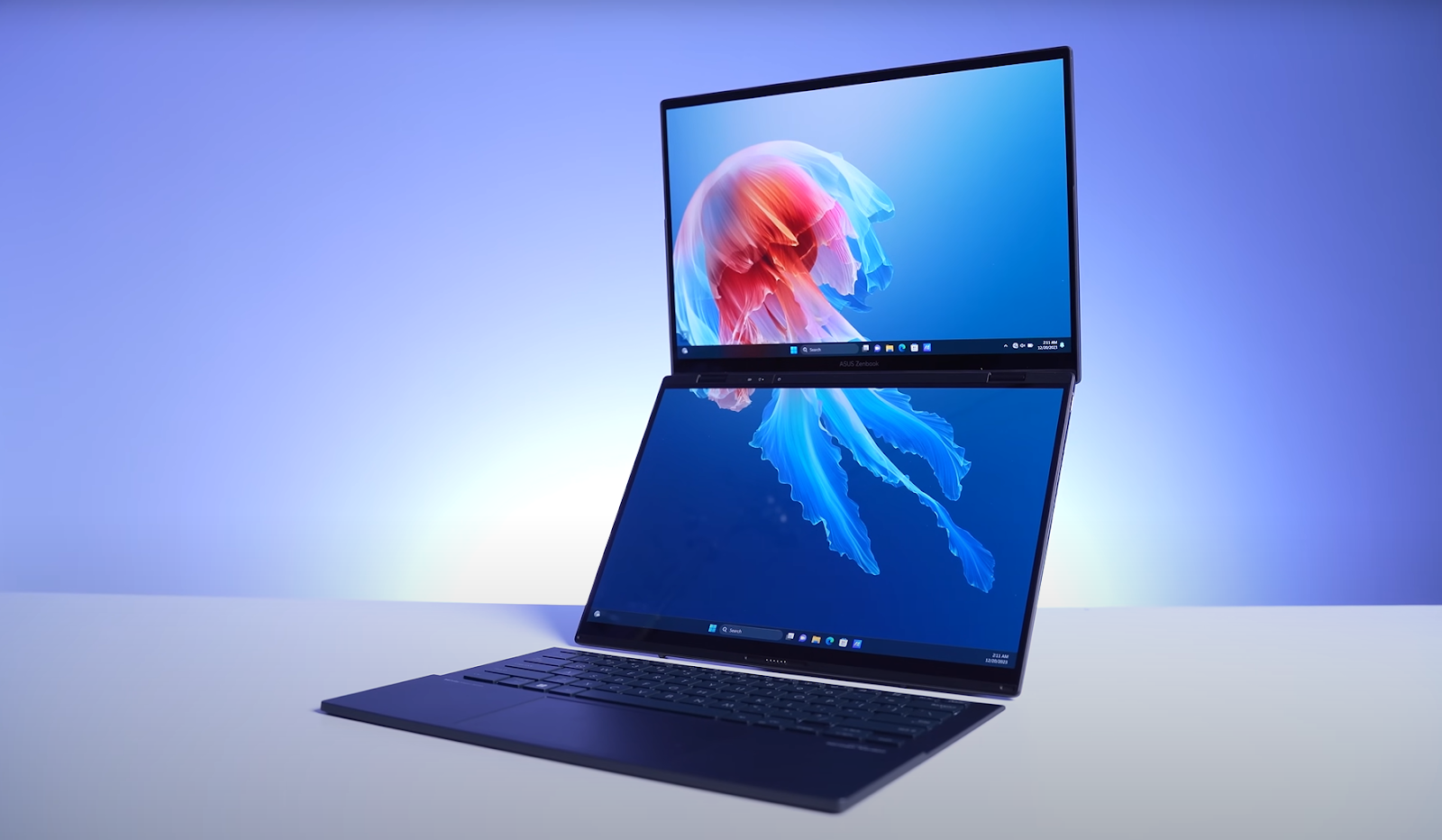
The laptop offers several user modes, including:
- Dual Screen Mode: Use both screens for multitasking, with the keyboard attached or detached.
- Laptop Mode: Attach the keyboard to the lower screen for a traditional laptop experience.
- Desktop Mode: Prop the laptop up using the built-in kickstand and connect it to the keyboard for a desktop-like setup.
- Sharing Mode: Lay the laptop flat to share content with others during meetings or presentations.
The integrated kickstand is another highlight, allowing you to adjust the laptop’s angle from 40° to 70° in dual-screen mode and up to 95° in desktop mode. The kickstand has undergone rigorous durability testing, ensuring it can withstand long-term use.
3. Powerful Performance and AI Capabilities
Under the hood, the Zenbook DUO is powered by up to an Intel Core Ultra 9 285H processor, which is part of Intel’s latest line-up of AI-optimized CPUs. This processor features a Neural Processing Unit (NPU) that accelerates AI tasks, making it ideal for applications like video editing, 3D rendering, and machine learning. The NPU also enhances real-time data processing and reduces latency, ensuring smooth performance even during demanding tasks.
The laptop comes with up to 32GB of LPDDR5X-7467 MHz memory and up to 2TB of PCIe 4.0 NVMe SSD storage, providing ample space for large files and fast data access. The onboard memory design allows for a thinner and lighter chassis without compromising on performance.
For graphics, the Zenbook DUO features Intel Arc Graphics, which delivers impressive visuals for both work and play. Whether you’re editing high-resolution videos or playing graphics-intensive games, the laptop handles it with ease.

4. Intuitive Software and Smart Features
The Zenbook DUO comes with a suite of intuitive software features designed to enhance the user experience. The ScreenXpert software is particularly noteworthy, as it streamlines multi-window operations on the dual screens. With features like App Switcher, App Navigator, and Microphone Switcher, you can easily manage and organize your workspace.
The Control Center provides quick access to essential functions like brightness adjustment, virtual input, and keyboard battery status. You can also enable Sharing Mode, which rotates the main screen content 180° for easy sharing during presentations.
The laptop also supports intuitive gestures, such as tapping with six fingers to summon the virtual keyboard or swiping with five fingers to maximize a window. These gestures make it easy to navigate the dual-screen setup and optimize your workflow.
5. Stunning Display and Audio Experience
Both screens on the Zenbook DUO are ASUS Lumina OLED displays, certified with Dolby Vision, Pantone Validated, and VESA DisplayHDR True Black 500. These certifications ensure that the displays deliver vivid colours, deep blacks, and accurate colour reproduction. The 120Hz refresh rate and 0.2ms response time make the screens ideal for both work and entertainment, providing a smooth and responsive visual experience.
The audio system is equally impressive, featuring Harman Kardon-certified speakers with Dolby Atmos support. The dual speakers deliver rich, immersive sound, whether you’re watching movies, listening to music, or participating in video calls. The Smart Amplifier and ASUS Audio Booster technology further enhance the audio experience, providing up to 5.25X louder sound without distortion.

6. Exclusive ASUS Perfect Warranty
Buyers will receive a 1-year ASUS Perfect Warranty valued at $249.99, covering accidental and customer-induced damage beyond the standard manufacturer’s warranty.
Specifications
| Feature | Specification |
|---|---|
| Processor | Up to Intel Core Ultra 9 285H |
| Graphics | Intel Arc Graphics |
| Memory | Up to 32GB LPDDR5X-7467 MHz |
| Storage | Up to 2TB PCIe 4.0 NVMe SSD |
| Display | Dual 14-inch 3K OLED (2880 x 1800), 120Hz, 500 nits, 100% DCI-P3 |
| Audio | Harman Kardon-certified, Dolby Atmos, Smart Amplifier |
| Battery | 75Wh lithium-polymer, up to 10 hours of battery life |
| Connectivity | Wi-Fi 7, Bluetooth 5.4, 2 x Thunderbolt 4, 1 x USB 3.2 Gen1 Type-A, HDMI 2.1 |
| Dimensions | 31.3 x 21.7 x 1.46 cm (without keyboard), 1.35 kg (without keyboard) |
| Operating System | Windows 11 Pro/Home |

Conclusion
The ASUS Zenbook DUO UX8406CA is a game-changer for multitaskers and creatives who need more screen real estate and flexibility. Its dual-screen design, powerful performance, and intuitive software make it a versatile tool for both work and play. While it may come with a steep price tag and a learning curve for the dual-screen setup, the benefits far outweigh the drawbacks for those who need a high-performance, multitasking powerhouse. If you’re looking to elevate your productivity and creativity, the Zenbook DUO is worth every penny.