Table of contents
Google held The Android Show: I/O Edition today, one week before its annual Google I/O developer conference. The event was a preview of what Android has planned for 2026, and it covered a lot of ground.
Google’s central message was that Android is moving from being an operating system to what it calls an “intelligent system.”
The show had three clear acts: a batch of phone features built around a new AI layer called Gemini Intelligence, a big update to Android Auto, and a surprise announcement of a brand-new laptop category called Googlebook. More on each of those below.
Android phone updates
Most of what Google announced for phones falls under the Gemini Intelligence umbrella. Here is a breakdown of each feature.
1. Gemini Intelligence
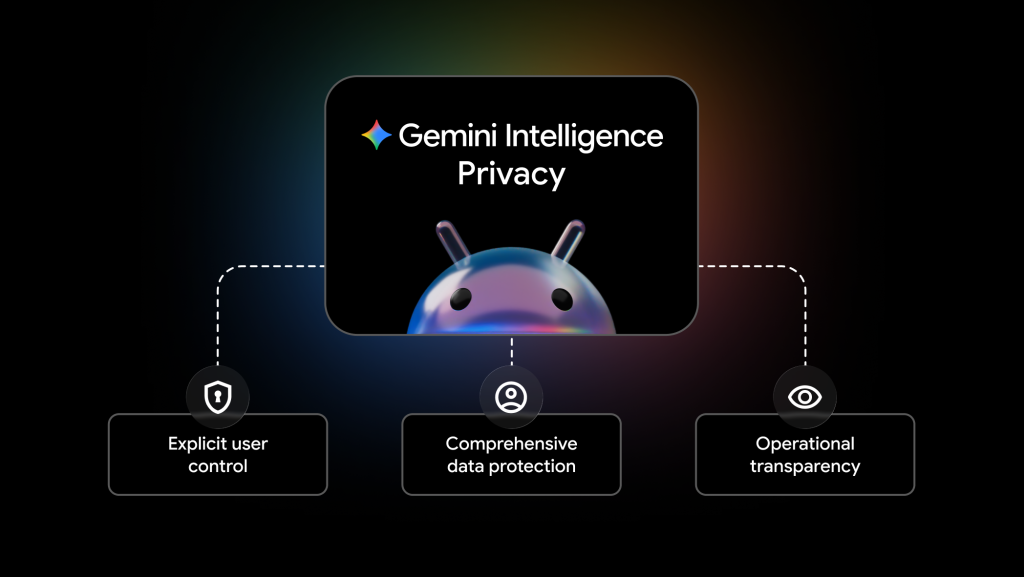
This is Google’s new name for a set of AI features that let Gemini do things for you across apps, not just answer questions inside a chat window. With Gemini Intelligence, you can long-press the power button over a grocery list on your screen and ask Gemini to build a delivery cart from it. You can also snap a photo of a travel brochure and ask Gemini to find and book a similar tour.
The visual design has been updated, too, with new animations that signal when Gemini is working in the background rather than waiting for your next prompt.
Gemini Intelligence is rolling out first on the Samsung Galaxy S26 series and the Google Pixel 10 series this summer, and expanding to watches, cars, and laptops later in 2026.
2. Rambler
Rambler is a new feature inside Gboard, Android’s keyboard app. It upgrades the existing voice-to-text tool so you can speak naturally without worrying about getting the words exactly right.
When you turn Rambler on, you can ramble, repeat yourself, say “um” and “like,” or change your mind mid-sentence. Rambler listens to everything and turns your spoken thoughts into a clean, concise message before you send it. Your audio is used only for real-time transcription and is not stored or saved.
- Works across multiple languages in a single message
- You review the output before sending anything
- Part of the first Gemini Intelligence wave on Pixel 10 and Galaxy S26 this summer
3. Create My Widget
Create My Widget lets you build custom home screen widgets just by describing what you want. You type a prompt like “Suggest three high-protein meal-prep recipes every week” or “show me wind speed and rain for cyclists,” and Android builds a working widget from it.
The same feature also creates custom Wear OS watch face tiles and desktop widgets on the new Googlebook laptops. It is coming to Pixel 10 and Galaxy S26 first this summer, with Wear OS and Googlebook support arriving later in 2026.
4. Gemini in Chrome for Android
Chrome on Android is getting a set of Gemini-powered features that were previously only available on desktop. Starting in late June 2026, you will be able to:
- Get page summaries and quick comparisons while browsing
- Use Gemini to help fill out complex forms by pulling relevant info from your connected apps like Gmail and Calendar
- Let Chrome auto-browse on your behalf, handling things like booking a parking spot or re-ordering from a restaurant
Gemini in Chrome also includes Nano Banana, an image tool that lets you create new images or customise ones you find on a webpage, directly inside the browser without switching to another app.
The auto-browse feature is available to Gemini Pro and Ultra subscribers. You will need a phone running Android 12 or higher with at least 4 GB of RAM.
5. Pause Point
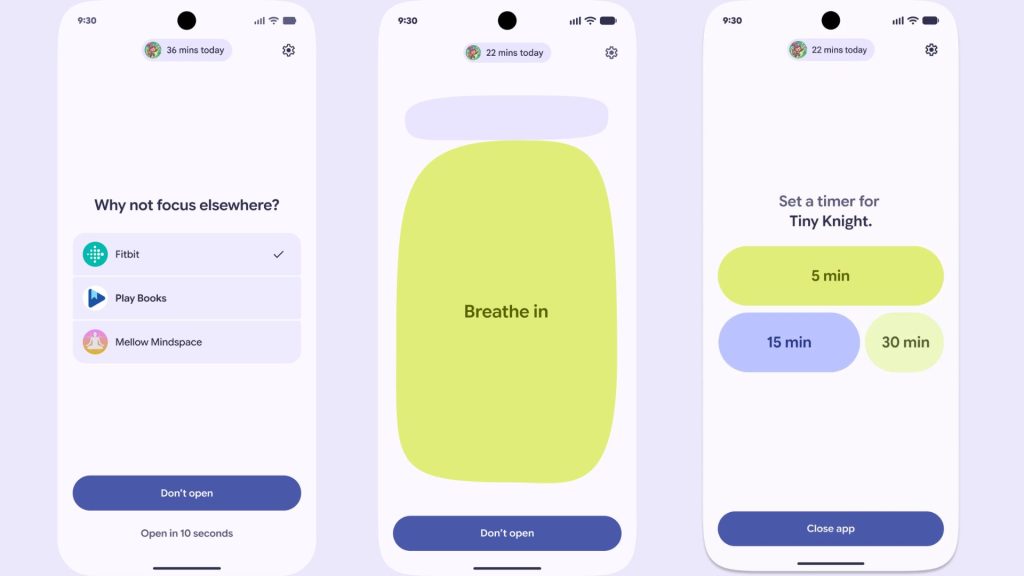
Pause Point is a new Digital Wellbeing tool that adds a 10-second pause screen when you open an app you’ve flagged as distracting. During that pause, you can choose to do a breathing exercise, set a timer in the app, look at a favourite photo, or open an alternative, such as an audiobook.
The intentional friction is baked in: turning Pause Point off requires a phone restart. It is part of Android 17, and Google says it is the beginning of a larger set of wellbeing tools that will come later in 2026.
6. Screen Reactions
Screen Reactions is a native Android tool for recording reaction videos. It captures your screen and front camera simultaneously, so you get the reaction overlay without needing a green screen, a second app, or any post-production editing.
It works with videos and images. Screen Reactions is coming to Pixel phones first this summer via Android 17, with no confirmed date yet for other Android phones.
7. 3D emoji
Google is redesigning all 4,000-plus Android emoji with a new 3D look, which Google is calling Noto 3D. The update gives the emoji more depth and visual weight, moving away from the flat style Android has used for years.
Pixel phones are getting them first, with a wider rollout across Google products coming later in 2026.
8. Adobe Premiere for Android
Adobe Premiere is finally coming to Android. The mobile version of Premiere has been available on iPhone since September 2025, and Google confirmed at The Android Show that the Android version will arrive this summer. It includes exclusive templates and effects built specifically for YouTube Shorts.
Support for the Advanced Professional Video (APV) format is also expanding. It currently works on the Galaxy S26 Ultra and the vivo X300 Ultra, with more Snapdragon 8 Elite devices to follow.
9. Instagram for Android upgrades
Meta and Google announced a set of Android-specific improvements for Instagram. These include:
- Ultra HDR photo and video capture and playback
- Night Sight integration for better low-light shots
- Built-in video stabilisation
- An improved upload pipeline so your photos and videos do not lose quality when you post them
A properly optimised Instagram tablet UI for Android tablets is also part of the update. These features are rolling out through 2026 on Android 17 devices, with Ultra HDR limited to high-end phones.
10. Instagram Edits: Android-exclusive AI tools
The Instagram Edits app is getting two Android-exclusive AI tools:
- Smart Enhance: upscales your photos and videos on-device in a single tap
- Sound Separation: splits a clip’s audio into individual tracks (voice, music, ambient noise, wind) so you can boost or remove each element separately
Both are rolling out to Android devices in 2026.
11. Quick Share and AirDrop interoperability
Quick Share, Android’s file-sharing tool, can now send files to iPhones. The cross-platform feature has been rolling out since the Pixel 10 launch in November 2025, and The Android Show confirmed it is expanding to devices from Samsung, OPPO, OnePlus, vivo, Xiaomi, and HONOR through 2026.
Two new additions were announced at the show:
- Any Android phone can now generate a QR code inside Quick Share to send files to an iPhone via the cloud, even without direct interoperability support
- Quick Share is coming inside WhatsApp and other apps later in 2026
12. iOS to Android migration
Google and Apple rebuilt the wireless migration tool for switching from iPhone to Android. The updated version transfers passwords, photos, messages, apps, contacts, your home screen layout, and even your eSIM without a cable.
It is launching on Samsung Galaxy and Google Pixel phones first, with a later 2026 release.
13. Android 17 security and privacy updates
Google announced its most substantial Android security package in years. Here is what is coming:
- Verified financial calls: Android will automatically end calls from numbers pretending to be your bank if the bank’s app is installed and opted in. Launching on Android 11 and above, starting with Revolut, Itau, and Nubank in the coming weeks.
- Live threat detection: on-device AI flags apps that quietly forward your SMS messages, misuse accessibility features, or hide their icon and run in the background. Landing on Android 17 in the second half of 2026.
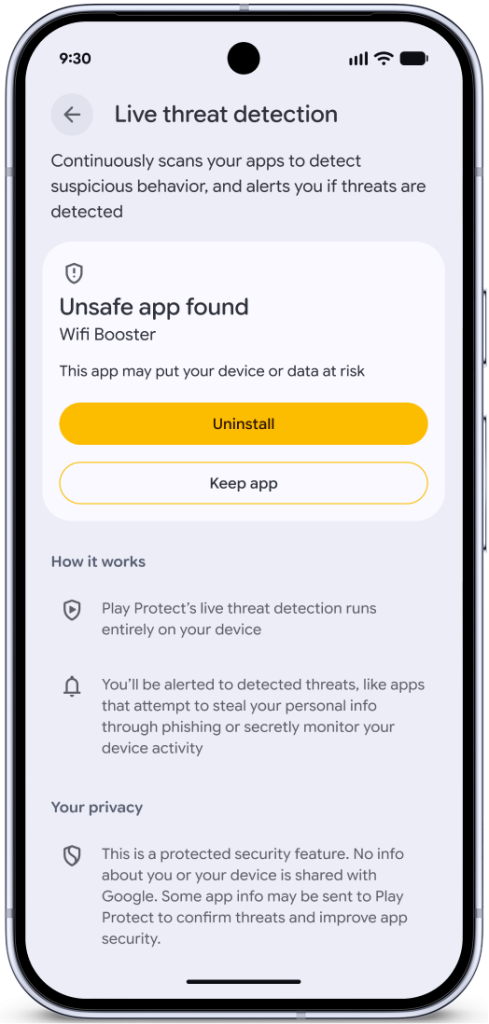
- Advanced Protection on Android 17: blocks non-accessibility apps from using accessibility access, disables device-to-device unlocking, and adds scam detection for chat notifications.
- Find Hub: marking your phone as lost now requires biometric authentication. It will also hide Quick Settings and block new Wi-Fi and Bluetooth connections.
- Default-on theft protection: Remote Lock and Theft Detection Lock are enabled by default globally on new and freshly reset Android 17 devices.
- OTP hiding: One-time passwords are automatically hidden from most apps for three hours after you receive them.
- Android OS verification: cryptographic proof that you are running an official Android build, coming to Pixel phones first.
- Post-quantum cryptography and a default-off 2G toggle are both arriving with Android 17.
- Intrusion Logging, built with Amnesty International and Reporters Without Borders, is rolling out to devices on the Android 16 December update or newer.
Android Auto updates
Android Auto is getting one of its biggest overhauls yet. The updates cover how the interface looks, how navigation works, and how Gemini fits into your time in the car.
1. Material 3 Expressive redesign
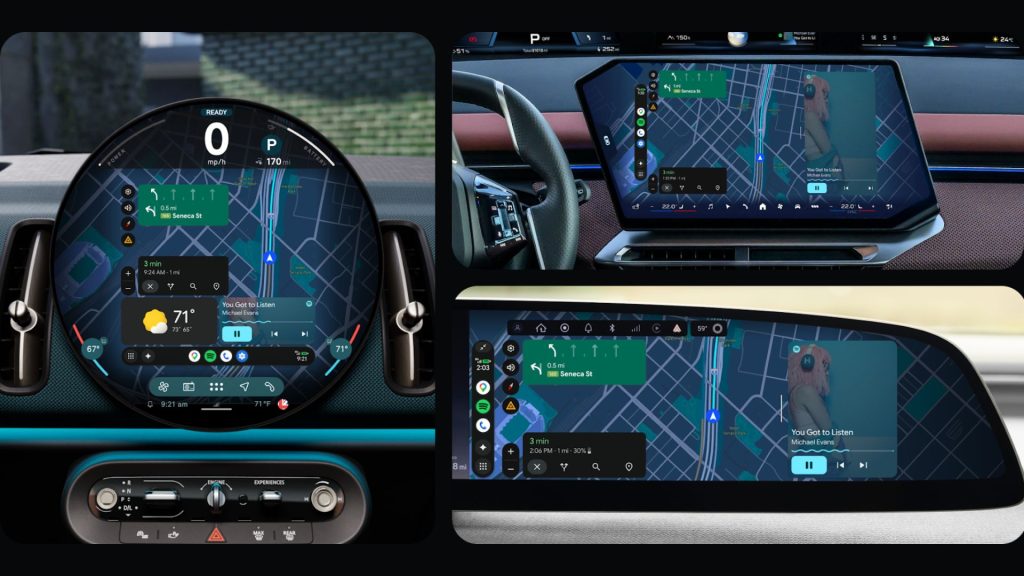
Android Auto’s interface is being rebuilt with Material 3 Expressive, the same design system Google rolled out on phones last year. The update brings new typography, smoother animations, wallpapers, and home screen widgets you can customise, including shortcuts for car-specific things like a garage door opener.
The layout now adapts to any screen shape or size in a car, including ultrawide displays, square screens, and circular OLEDs like the one in the Mini Cooper.
2. Google Maps Immersive Navigation
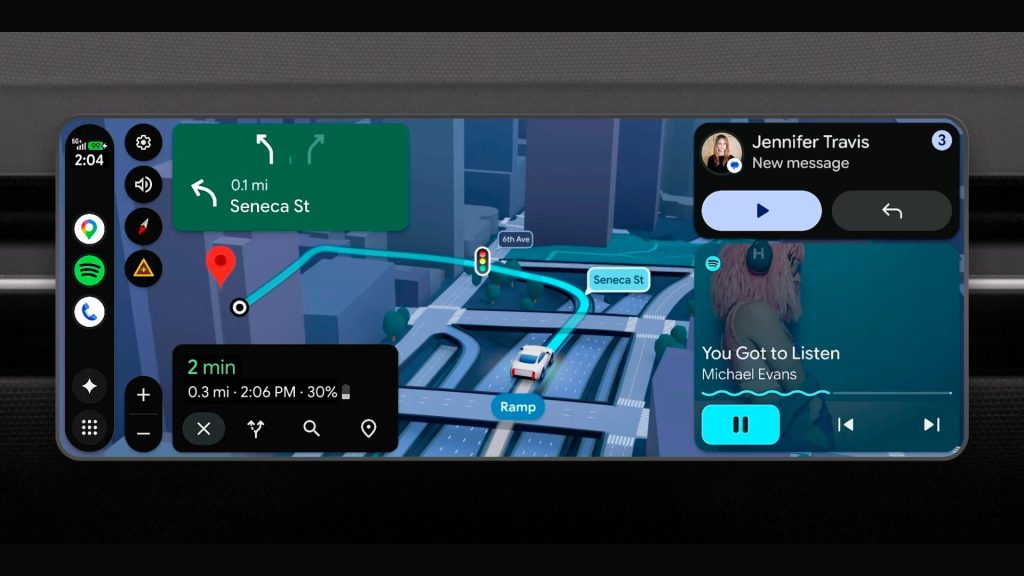
Google is calling this the biggest update to Google Maps in over a decade. Immersive Navigation replaces the current flat map with an edge-to-edge 3D view that shows buildings, bridges, overpasses, and terrain. It also highlights traffic lights, stop signs, and lane markings to make tricky turns and merges clearer.
When you drive under an overpass, the map uses a transparency effect to show you what is on the other side. Google Maps Immersive Navigation is rolling out through 2026.
3. Live Lane Guidance
Live Lane Guidance uses your car’s front-facing camera to determine exactly which lane you are in and to provide precise, real-time instructions for lane changes and exits. This is different from the generic “stay left” or “stay right” guidance you get from standard navigation.
This feature is only available in cars with Google built-in (Android Automotive), not in phones connected to Android Auto. It has already been piloted on the Polestar 4 and is set to expand through 2026.
4. Premium entertainment in the car
Google is bringing full-HD 60fps video to Android Auto while your car is parked or charging. Apps like YouTube will play in HD at 60 frames per second with Dolby Atmos spatial audio, and the content automatically switches to audio-only when you start driving.
The supported cars at launch include BMW, Ford, Genesis, Hyundai, Kia, Mahindra, Mercedes-Benz, Renault, Skoda, Tata, and Volvo, arriving later in 2026. Dolby Atmos is coming to a slightly shorter list: BMW, Genesis, Mahindra, Mercedes-Benz, Renault, Skoda, Tata, and Volvo.
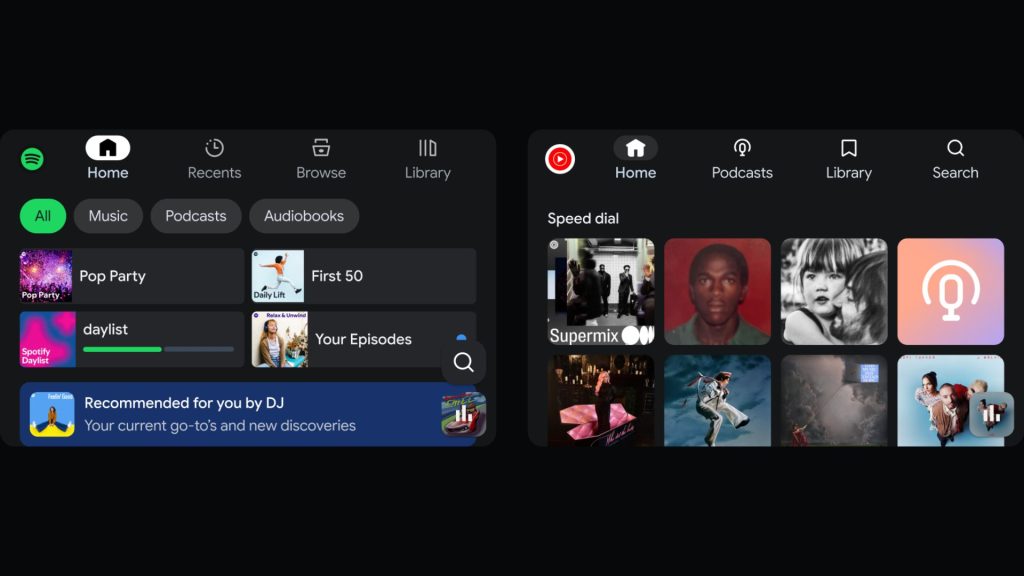
YouTube Music and Spotify are also getting redesigned interfaces optimised for use in cars.
5. Gemini in Android Auto
Gemini is now broadly available in Android Auto for hands-free questions, brainstorming, and general conversation while driving. DoorDash is the first app to support in-car food ordering through Gemini, letting you place an order from your dashboard.
Later in 2026, if your phone has Gemini Intelligence, you will also be able to access it in Android Auto. That includes things like asking Gemini what a dashboard warning light means, or checking whether a piece of furniture will fit in your boot.
Beyond the phone
Alongside everything coming to phones and cars, Google announced one entirely new product category and teased where Gemini Intelligence is heading beyond Android.
Googlebook
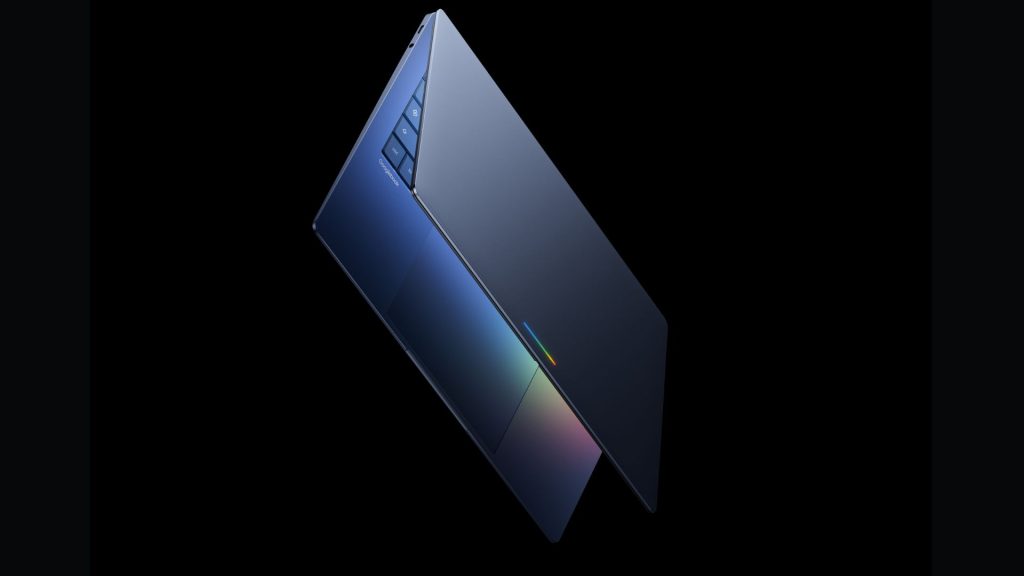
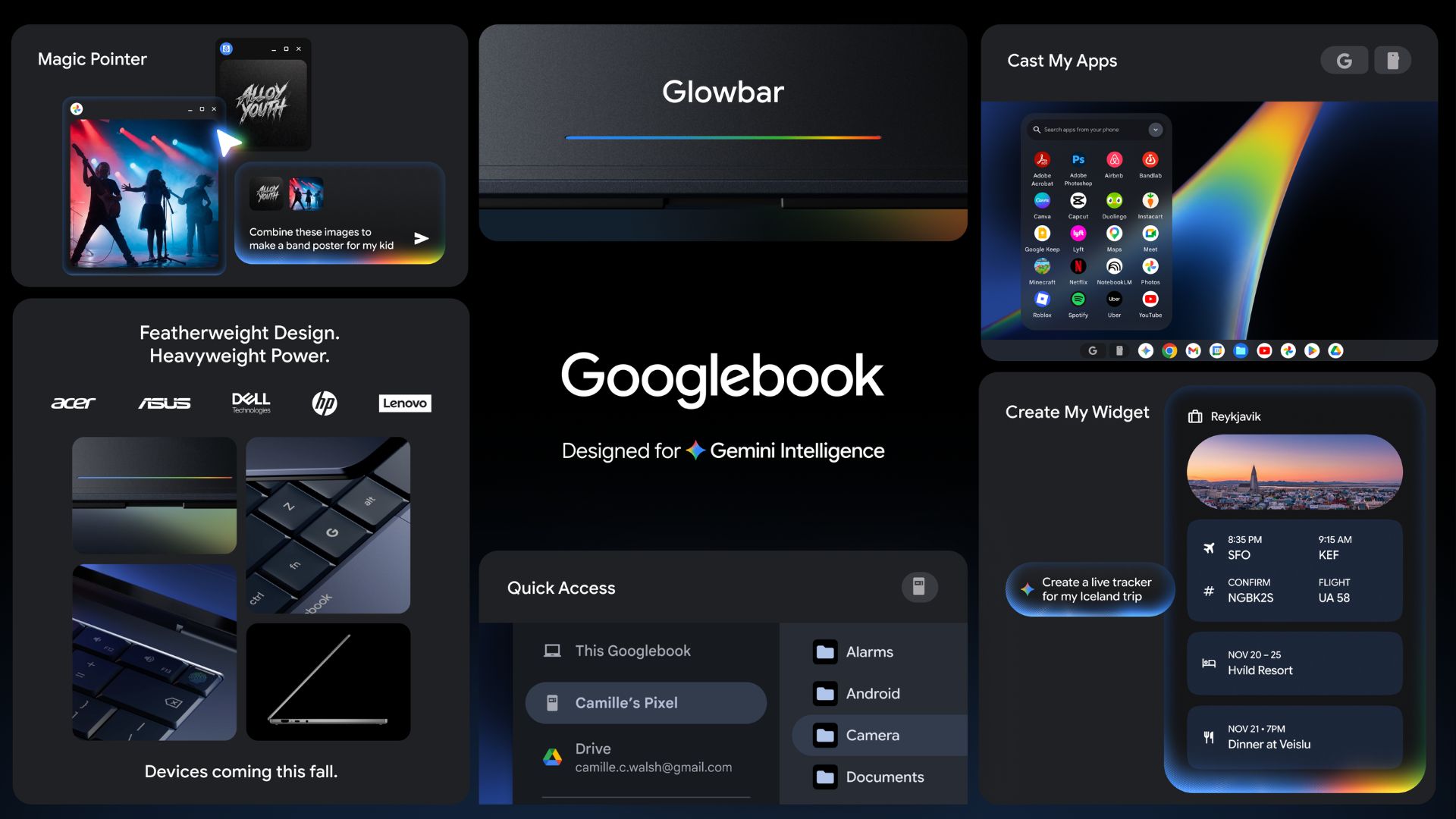
Googlebook is Google’s new laptop category. It is built on Android and takes key parts of ChromeOS, combining the Chrome browser, the full Google Play app store, and Gemini Intelligence into a single laptop experience.
Google framed it as a rethink of the laptop, much like the original Chromebook reimagined affordable computing in 2011. The first Googlebooks are being built by Acer, ASUS, Dell, HP, and Lenovo, and are arriving this fall (September to November 2026).
Every Googlebook will have a signature hardware feature called the Glowbar, a light bar on the lid that Google says is functional, not just decorative. It is a callback to the original 2013 Chromebook Pixel. Google has not yet detailed exactly what the Glowbar does.
Key Googlebook features
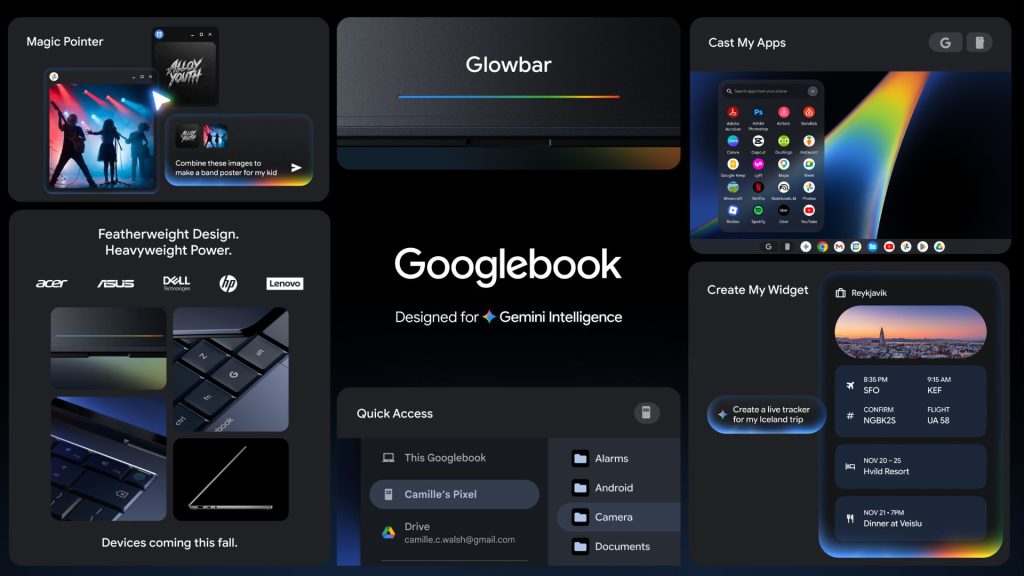
- Magic Pointer: co-developed with Google DeepMind, the cursor surfaces contextual Gemini suggestions as you move around the screen. You can point at a date in an email to create a meeting, or select two images and ask Gemini to visualise them together.
- Create My Widget: the same widget builder from Android phones works on the Googlebook desktop, letting you build personalised dashboards for travel plans, reservations, and countdowns.
- Cast My Apps: open any app from your Android phone on the Googlebook screen without downloading it. This means you can tap your phone’s food-delivery app on your laptop, place an order, and get back to work without leaving your screen.
- Quick Access: browse, search, and insert files from your Android phone directly in the Googlebook file browser, without any manual transfers.
What about Chromebook?
Chromebooks are not being discontinued. Google confirmed that existing Chromebooks released in 2021 or later will continue to receive their full 10-year automatic security update commitment. Many eligible Chromebooks will also be able to transition to the Googlebook experience once it launches.
Google told The Verge that new Chromebooks will continue to launch after Googlebook. The two are being positioned differently: Chromebook for schools and businesses at scale, Googlebook as the premium Gemini-first consumer option.
One important note: some online reports refer to the underlying OS as “Aluminium OS.” That is an internal codename, not the final product name. Google told The Verge that the official OS branding will be announced later in 2026.
What is not confirmed yet
Google has not revealed chip platforms, model names, prices, or specific launch regions for the first Googlebooks. The only confirmed detail on timing is “this fall.” More information is expected before the devices go on sale.
Gemini Intelligence on Wear OS and Android XR
Wear OS and Android XR did not get dedicated segments at The Android Show. Both were mentioned as future recipients of Gemini Intelligence later in 2026. The one concrete Wear OS detail from the show is that Create My Widget will generate Wear OS tiles.
Google’s last Android XR update was a separate blog post on April 7, 2026, covering five new features for the platform. Nothing new for Android XR was announced on May 12.
There were no Pixel 11, Pixel Watch, Pixel Buds, or Pixel Tablet announcements at this event. Google typically reserves hardware reveals for later in the summer.